쉬는 날이고 하니 삘 받은 김에 쓰러 왔다
복잡한 전선 정리, 작은 부분까지 깔끔한 디테일을 좋아하는 사람이라면 아마 좋아할 내용
쿠션어 생성기를 만들어요
올해의 첫 미니 개발 일지. 제목부터 심상치 않다 . . .입사하고 처음 만든 게 이런 서비스일 줄이야 그러니까 이 아이디어는 애초에신입사원 연수 발표를 준비하면서 시작되었는데 . . . . 발표
nogotit.tistory.com

이전 글에서 언급했듯 영원히 안 올 줄 알았던 tailwindCSS className 정리 자동화가 오늘의 주제.
발단
사실 이 이야기는 어디로 거슬러 올라가냐면
싸피에서 자율플젝을 하던 때(24.12월) 부터 시작해야 한다
그때 뭐시냐 싸피 슈퍼앱인가 선정돼서(전국 3팀인데 우리가 그 중 하나였다 ㅎㅎ) 만든답시고 상당히 규모 큰 프로젝트를 유지보수성 좋게 만드느라 머리를 쥐어짜던 시절이 있었다
당시 우리는 UI 구현에 tailwind CSS를 사용하고 있었는데
진짜 사용하기 쉽고 너무 편한 와중에 딱 한 가지 단점이 무엇이냐
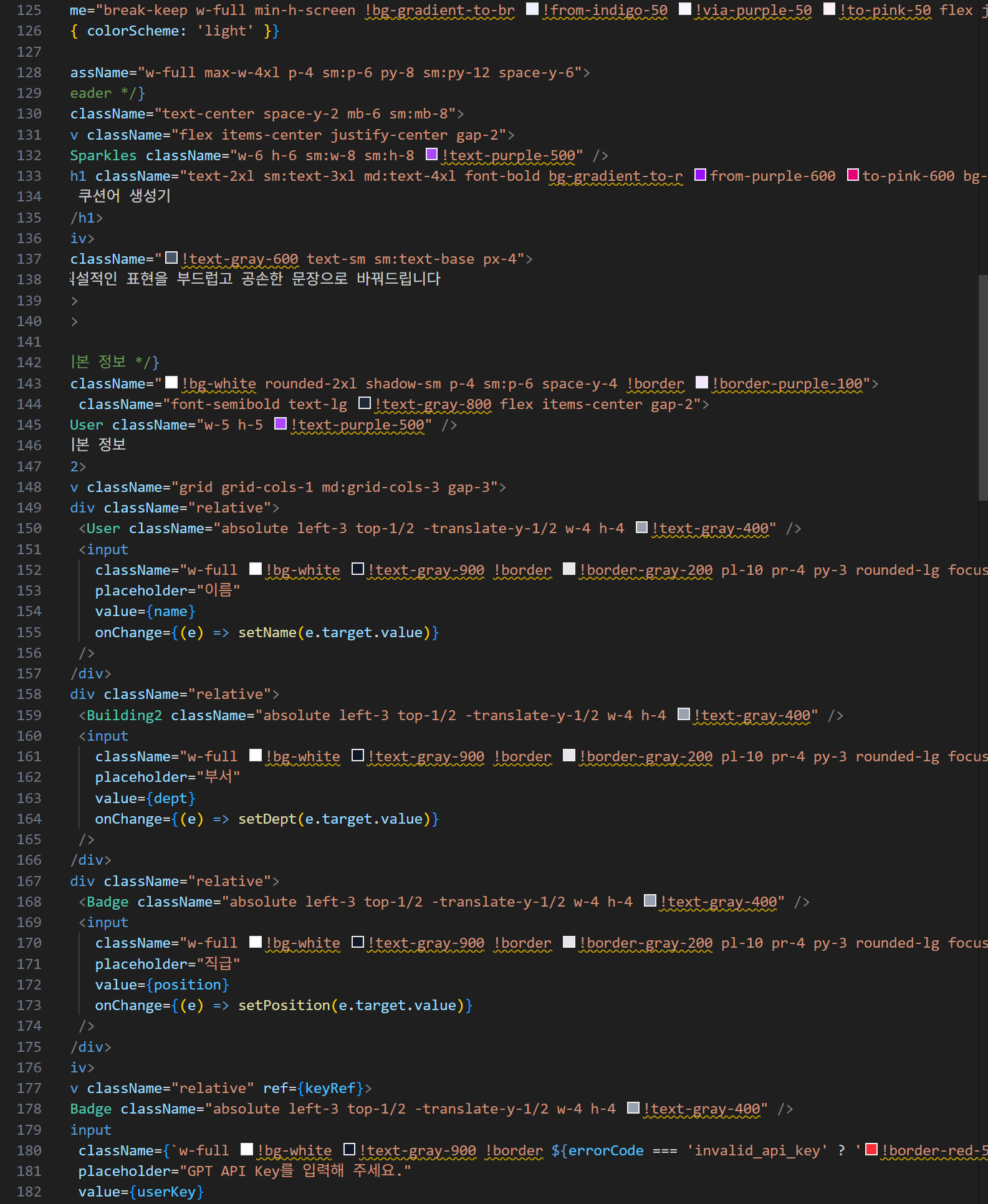
tailwindCSS는 className을 추가하는 방식으로 스타일링을 하기 때문에
조금이라도 CSS가 복잡해지기 시작하면 코드 가독성이 극악이 된다는 점이다.
위 사진처럼 important가 들어가기라도 하면 ... 레이아웃 수정 시 정말 최악의 최악의 최악의 끝을 달림
오늘은 이러한 가독성 엉망진창을 막기 위해
자율플젝 시절 활용했던 tailwindCSS className 정렬 rule을 가져와서
포맷팅 자동화를 어떻게 구현할 것인가? 를 중점적으로 다뤄 보겠다.
에휴 겨우 찾았네 ... gitlab 커밋로그 30분 뒤졌다
접은글 안에 당시 작성한 규칙 + 코드 예시가 있다.
SSAFICE / FE/src/pages/landing/ui/Page/Page.tsx
//MARK: 데이터
/* 임시 데이터 입니다 */
const selectedContent = `Lorem ipsum dolor sit amet consectetur.
Lacinia volutpat non mollis parturient commodo.
Lorem ipsum dolor sit amet consectetur.
Lacinia volutpat non mollis parturient commodo.
`
//MARK: 공통 CSS
/*
className 순서는 이렇게 작성되었습니다.
1) flex 관련 속성(flex, flex-col 등의 방향 설정, gap 설정, justify / items / self 등의 정렬 설정 순서로)
2) 크기 관련 속성(width, height, margin, padding, z-index 순서로)
3) 글자 관련 속성(글자 색, heading, 줄바꿈(whiteSpace) 순서로)
4) 배경 관련 속성(배경 색, border 순서로)
5) 기타 속성(radius, 기타 속성 순서로)
*/
const btnClasses: string = `
px-spacing-28 py-spacing-10
text-color-text-interactive-secondary heading-desktop-lg
bg-color-bg-interactive-selected
rounded-radius-32
` // 화면 하단 버튼 요소에 공통 적용됩니다.
const selectedBtnClasses: string = `
${btnClasses}
text-color-text-interactive-secondary-press
bg-color-bg-interactive-selected-press
border border-color-border-focus-ring border-2
` // 선택된 탭 버튼에 적용됩니다.
export const LandingPage = () => {
return (
<div className='flex flex-col'>
{/* MARK: 화면 상단
*/}
<div
className='
flex flex-col gap-spacing-32 items-center justify-start
h-[400px] py-spacing-40
'
>
{/* 헤더 텍스트 영역 */}
<div className='flex flex-col gap-spacing-16 items-center'>
<div className='text-color-text-primary heading-desktop-5xl'>SSAFY 일정관리</div>
<div className='text-color-text-primary heading-desktop-4xl'>SSAFICE와 함께 시작하기</div>
<div className='text-color-text-primary heading-desktop-lg'>
SSAFICE는 SSAFY 구성원에게 최적의 일정 관리 서비스를 제공합니다.
</div>
</div>
<button
type='button'
className='
flex
px-spacing-28 py-spacing-10
text-white heading-desktop-lg
bg-color-bg-interactive-primary
rounded-radius-32
'
>
SSAFICE 바로가기
</button>
</div>
{/* MARK: 화면 하단
*/}
<div
className='
flex flex-col gap-spacing-40
py-spacing-64
border border-t-color-border-tertiary
'
>
{/* 텍스트, 탭 5개 영역 */}
<div className='flex flex-col gap-spacing-20 items-center'>
<div className='text-color-text-primary heading-desktop-xl'>
교육생과 프로 모두에게 최적의 경험을 제공합니다.
</div>
{/* button tabs */}
<div className='flex flex-row gap-spacing-4'>
<button type='button' className={selectedBtnClasses}>
mm연동
</button>
<button type='button' className={btnClasses}>
대시보드
</button>
<button type='button' className={btnClasses}>
캘린더
</button>
<button type='button' className={btnClasses}>
할 일 등록
</button>
<button type='button' className={btnClasses}>
리마인드
</button>
</div>
</div>
{/* 탭 이미지, 상세설명 영역 */}
<div
className='
flex justify-center
w-320 h-100 px-spacing-80
'
>
{/* 탭 설명 영역 */}
<div
className='
flex flex-col gap-spacing-32 items-start justify-center
w-full
'
>
<div className='flex flex-col gap-spacing-16 '>
<div className='text-color-text-primary heading-desktop-4xl'>mm 연동</div>
<div className='text-color-text-primary heading-desktop-lg whitespace-pre-wrap'>
{selectedContent}
</div>
</div>
<div className='flex gap-spacing-12 justify-start'>
<div className='text-color-text-info heading-desktop-lg'>SSAFICE 바로가기</div>
<div className='text-color-text-info heading-desktop-lg'>-></div> {/* SVG 영역 */}
</div>
</div>
{/* 이미지 영역 */}
<div>
<img src='https://picsum.photos/600/400' />
</div>
</div>
</div>
</div>
)
}
접은글을 봐도 되지만 간단히 아래 사진으로 설명하자면
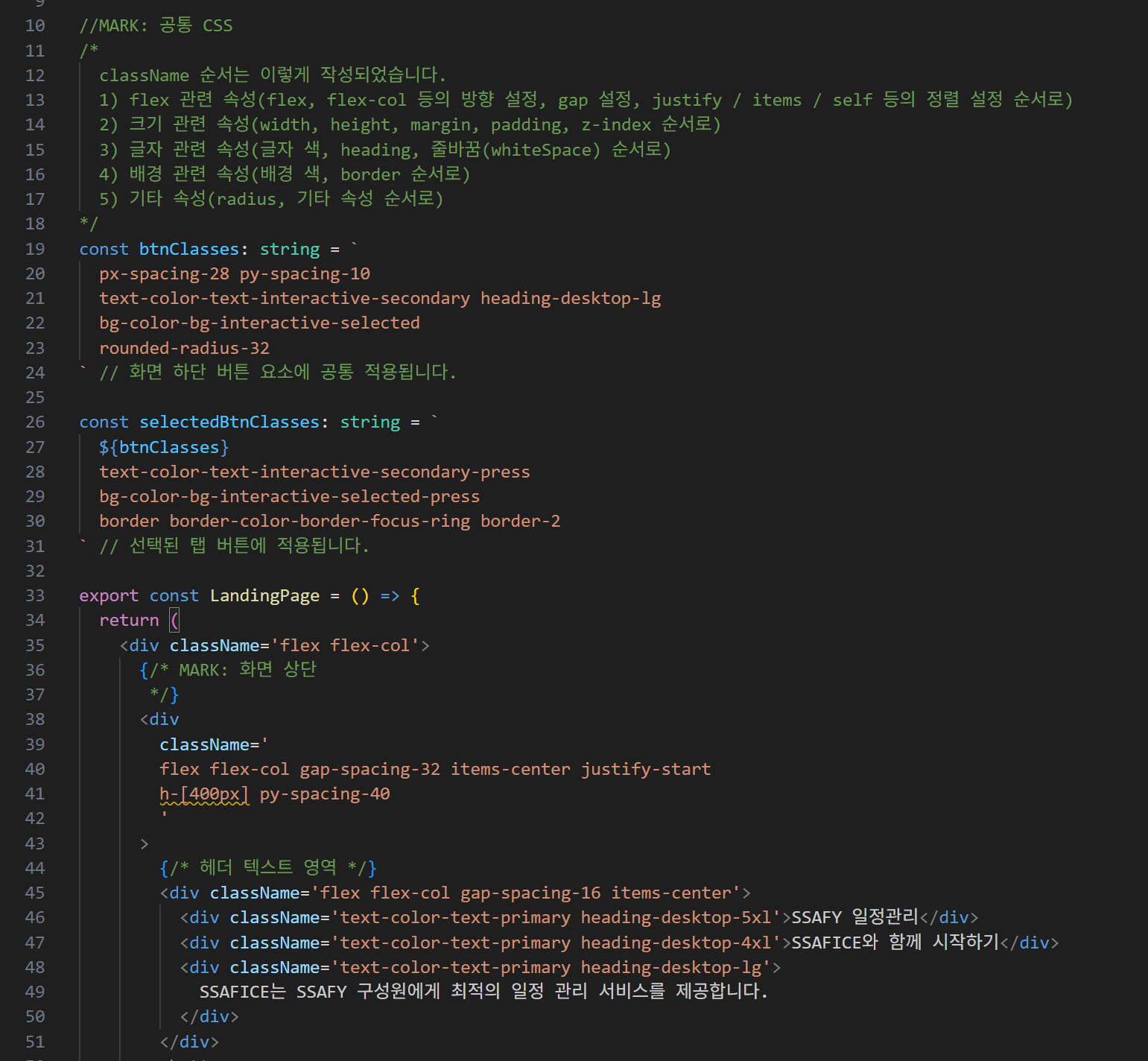
당시에는 figma 시안에서 레이아웃 구현을 직접 시안에 기록된 수치 보고 찍어가며,
위치와 정렬 방향 파악하고 flex 줄세워서 코딩했기 때문에 (새삼 2년 사이에 AI가 많이 발전했음을 느낀다 ...)
레이아웃 유지보수를 위해서는 무엇보다도 className 순서 규칙을 정하는 게 중요했다.
어떤 건 height가 맨 앞이고 어떤 건 font weight이 맨 앞이고 이러면 진짜 돌아버림
직접 UI를 구현하면서 figma에 자주 나오는 속성들을 추려 대략적인 순서 규칙을 만들었었다.
실제로 그냥 className을 일자로 쭉 ~~~~~~ 쓰는 것보다
위 규칙대로 줄바꿈을 해주면서 작성하면 당연히 훨씬 가독성이 좋아진다.
구현 방향
className rule이 있는 것까진 좋은데, 내가 그 rule을 일일이 기억하고 줄 바꿔 가며 정렬하는 건 너무 짜치는 일이다.
나는 이 포맷팅 규칙을 전역 프롬프트로 박아놓고 사용하려고 한다.
codex CLI 환경에서 포맷팅 명령어와 파일명을 입력하면
해당 파일에 정의된 tailwindCSS className을 내가 작성해 둔 rule에 맞게 순서를 변경하거나 줄바꿈을 시키도록 만들 것임
Codex Quickstart
저번에 쿠션어 생성기 만드느라 결제한 OpenAI API Key가 남아있기 때문에 ....
이번에는 Codex를 사용한다.
작년에 무신사 코테 보면서 설치해둔 것도 있고 그래서 지금 당장 VSC에서 써보기 좋을 듯.


나는 이렇게 터미널에 띄워놓고 쓰는 AI를 처음 써보기 때문에 ㅋㅋㅋ
몇 가지 걱정도 있었고 ... 간단한 테스트가 필요했다.
일단 .. 포맷팅을 시키면 얘가 매번 파일을 다 읽느라 토큰을 너무 많이 쓰게 되는 게 아닌가? 싶었다.
tailwindCSS는 string 형식으로 저장해서 돌려 쓰지 않는 이상 tsx/jsx return 파트에서만 사용될 텐데
이러면 JS/TS로 작성된 비즈니스로직을 검토할 필요가 없으므로 토큰을 절약할 수 있다.
이 부분을 물어봤고 line만 지정해서 수정할 수 있음을 확인했다.
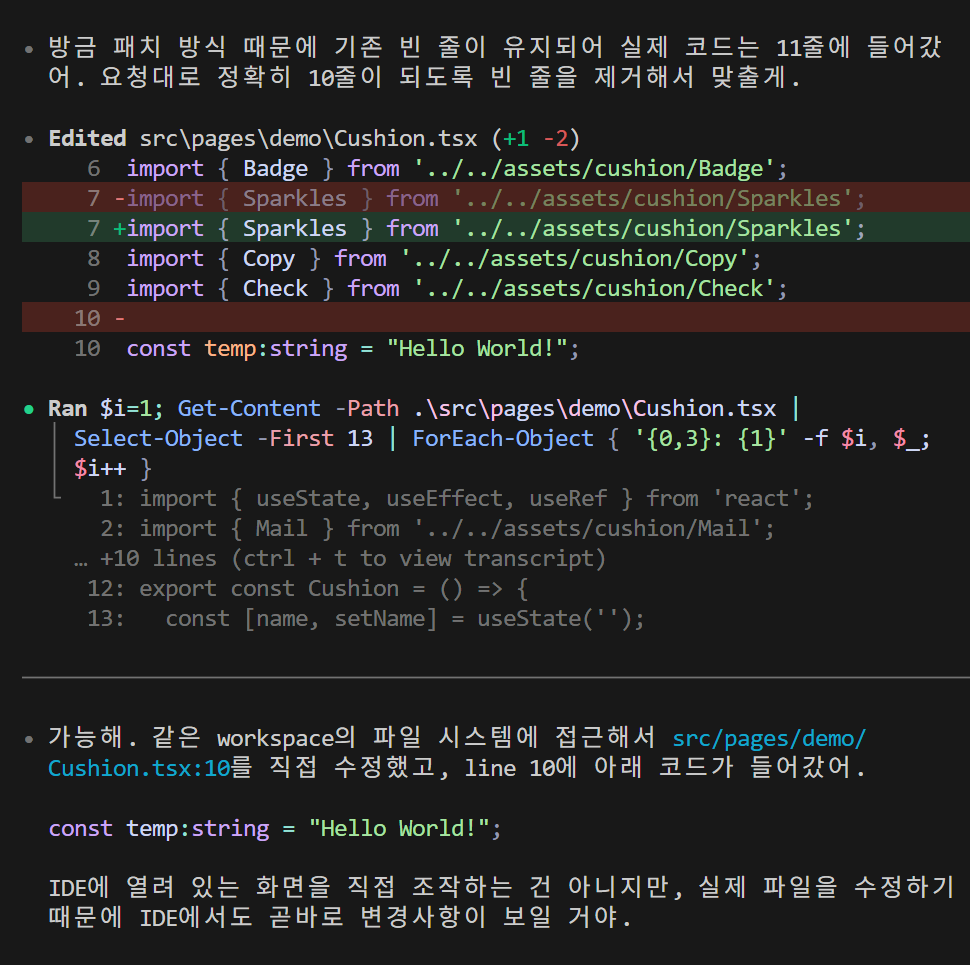

테스트를 했으니 본격적으로 딸깍 구현 시작 ...
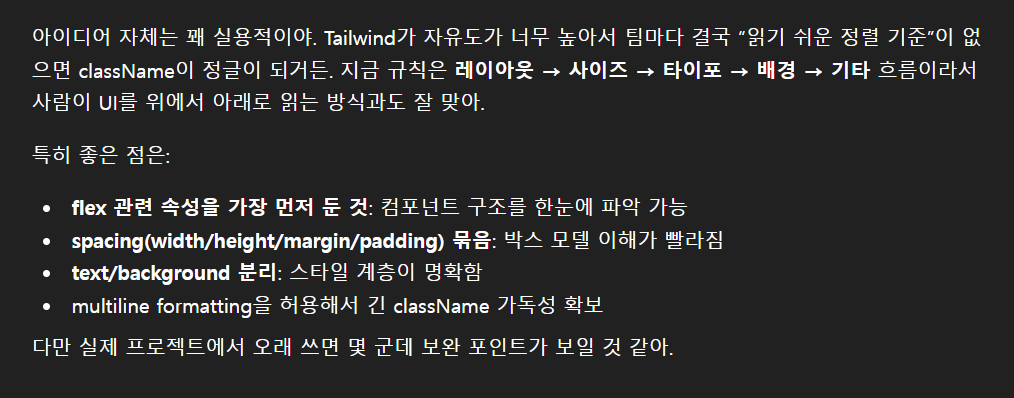
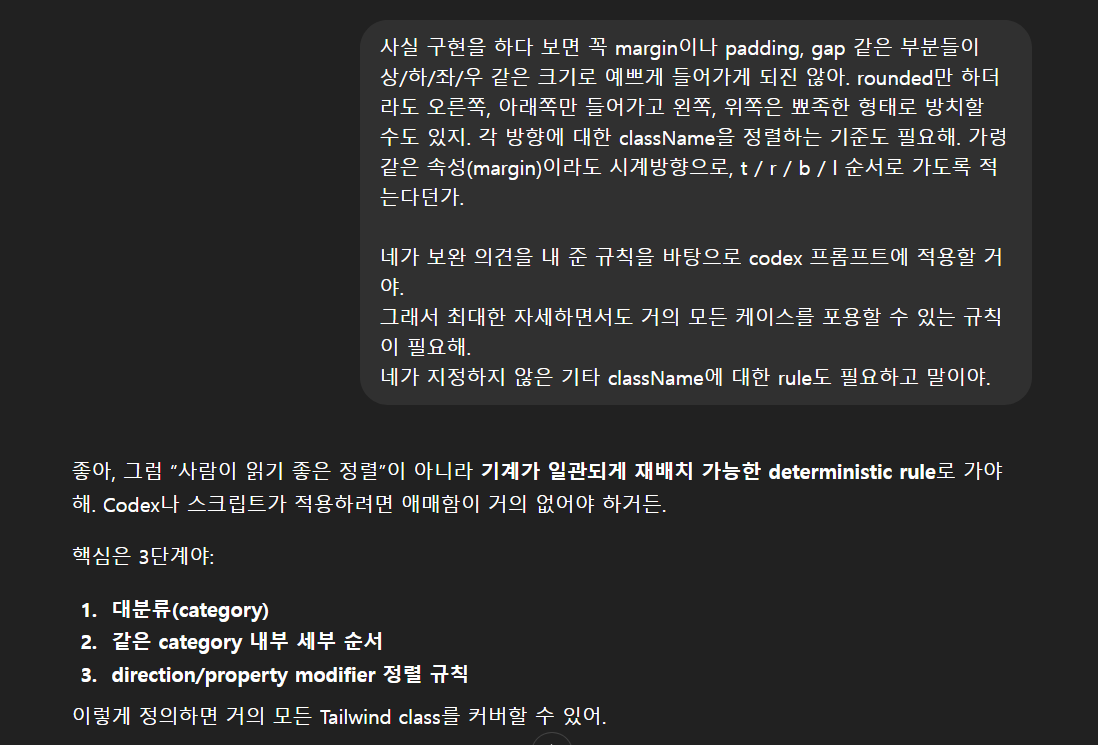
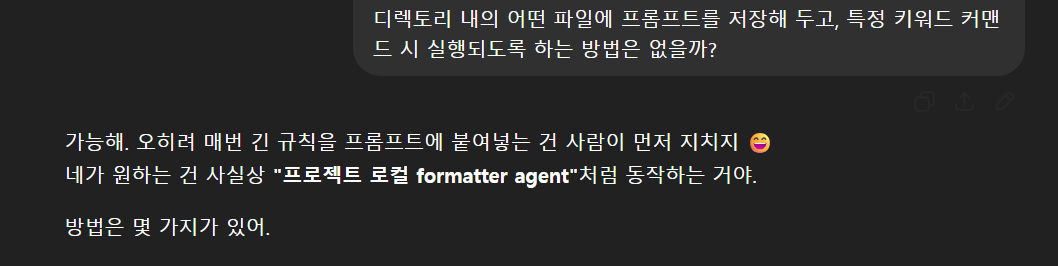

요런 이야기들을 통해서

프로젝트 디렉토리에 tailwind.codex.config.md 파일을 만들었다.
이 파일에는 내 기존 아이디어를 바탕으로 gpt가 보완 작성해 준 codex용 프롬프트가 들어가는데
전문은 접은글 내에 있음
# Tailwind ClassName Formatter Rule (FMT_CSS_V1)

Reformat Tailwind className strings only.
Do NOT modify logic, text, JSX structure, variable names, comments, imports, or formatting outside className.

---

## 1. Category Order

Sort classes in this order:

1. layout
2. position
3. flex-grid
4. sizing
5. spacing
6. typography
7. visual
8. effects
9. interaction
10. state-responsive
11. unknown-custom

---

## 2. Layout

Order:

block
inline-block
inline
hidden
contents
table
flow-root
container

---

## 3. Position

Order:

static
relative
absolute
fixed
sticky

inset
inset-x
inset-y
top
right
bottom
left

z

Examples:
absolute top-0 right-0 z-10

---

## 4. Flex / Grid

Display:
flex
inline-flex
grid
inline-grid

Flex direction:
flex-row
flex-row-reverse
flex-col
flex-col-reverse

Wrap:
flex-wrap
flex-nowrap

Grid:
grid-cols-_
grid-rows-_
col-span-_
row-span-_
auto-cols-_
auto-rows-_

Gap:
gap
gap-x
gap-y

Alignment:
justify-_
items-_
content-_
self-_
place-items-_
place-content-_
place-self-\*

---

## 5. Sizing

Order:

w
min-w
max-w

h
min-h
max-h

aspect
size

---

## 6. Spacing

Margin order:
m
mx
my
mt
mr
mb
ml

Padding order:
p
px
py
pt
pr
pb
pl

Direction order:
x
y
t
r
b
l

Examples:
px-4 py-2 pt-6
mr-2 mb-4

---

## 7. Typography

Order:

font-\*
text-size
text-color
text-align
leading
tracking
line-clamp
whitespace
break
truncate
list
placeholder

Examples:
font-bold text-lg text-slate-900 text-center whitespace-pre-wrap

---

## 8. Visual

Background:
bg-_
bg-opacity-_
bg-gradient-_
from-_
via-_
to-_

Border:
border
border-x
border-y
border-t
border-r
border-b
border-l
border-width
border-style
border-color

Radius:
rounded
rounded-t
rounded-r
rounded-b
rounded-l
rounded-tl
rounded-tr
rounded-br
rounded-bl

Corner order:
tl
tr
br
bl

Other:
divide-_
ring-_
outline-\*

Examples:
bg-white border border-slate-200 rounded-xl shadow-sm

---

## 9. Effects

Order:

shadow
opacity
mix-blend
blur
brightness
contrast
filter
backdrop
overflow
overflow-x
overflow-y
object
isolate

---

## 10. Interaction

Order:

cursor
pointer-events
resize
select
touch-action
appearance
accent
caret
scroll
snap

---

## 11. State / Responsive

Always place after base classes.

Modifier priority:
dark
sm
md
lg
xl
2xl
hover
focus
focus-visible
active
disabled
visited
checked
group-hover
peer-focus

Nested modifier order:
theme > responsive > state

Examples:
dark:md:hover:bg-slate-700
md:flex
hover:bg-blue-500

---

## 12. Unknown / Custom

Unknown or custom classes go last.

Rules:

- preserve original token
- sort alphabetically among unknown classes

Examples:
calendar-selected
my-custom-class
data-[active=true]:bg-red-500

---

## 13. Deduplication

If same property appears multiple times:

- keep only last occurrence

Example:
BAD: px-4 px-8
GOOD: px-8

Do NOT remove semantically different classes.

---

## 14. Important Modifier

Preserve ! modifier.

Examples:
!mt-0
hover:!bg-red-500

Do not strip or move !.

---

## 15. Multiline Formatting

If total classes <= 5:
keep single line

Example:
className="flex items-center gap-2"

If total classes >= 6:
multiline by category

Example:
className="
flex flex-col gap-4 items-center

w-full px-4 py-2

text-sm text-slate-900

bg-white border border-slate-200 rounded-xl shadow-sm

hover:bg-slate-50 disabled:opacity-50
"

Insert one blank line between categories.

---

## 16. Safety Rules

Allowed changes:

- reorder classes
- remove duplicates
- add multiline formatting

Forbidden changes:

- rename classes
- remove unknown classes
- change JSX
- change string quotes
- change logic

Output only modified file.
그리고 이 룰 적용을 위해 codex에
를 입력해 주면

이렇게 자기가 알아서 포맷팅 규칙이 있는 파일을 찾아 학습해둔다.
이제 써보자 .. ㅋㅋ

중간중간 엔터를 쳐 줘야 하는 점도 불편하고 너무 오래 걸린다 ;;


그리고 지가 제대로 됐는지 확인한다고 갑자기 혼자 빌드를 돌려봄
야이자식아 그건 내가 할 수 있어 넌 가만히 있어 토큰쓰지마

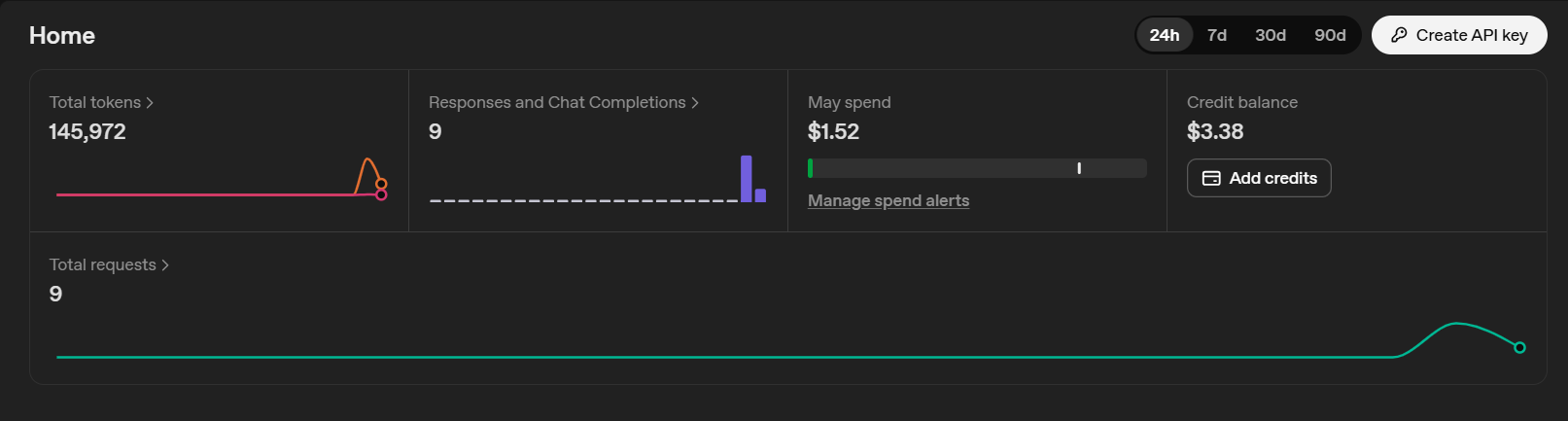
무엇보다도 내가 이거 정리 한 번 하자고 거의 1달러를 썼다는 게 제일 충격이다
ㅋㅋㅋㅋㅋㅋㅋㅋㅋㅋㅋㅋㅋㅋㅋㅋㅋㅋㅋㅋㅋ
ㅋㅋㅋㅋㅋㅋㅋㅋㅋㅋㅋㅋㅋㅋㅋㅋㅋ
ㅋㅋㅋㅋㅋㅋㅋㅋㅋㅋㅋㅋㅋㅋ
아 !!!!!!!!!!!!!!!!!!!!!!!!!!!!! 야 내가 안 시킨 거 하지 마 !!!!!!!!!!!!!!!!
Agentic 성격이 있는 AI를 처음 써보는데 . . . . 아 너무 힘든데 ... ?
아예 얘가 움직일 수 있는 범위를 화이트리스트처럼 관리해야 할 것 같다 ..
그리고 이 녀석이 포맷팅해준 코드를 공개합니다 . . .
return (
<div
className="
flex justify-center
w-full min-h-screen
break-keep
!bg-gradient-to-br !from-indigo-50 !via-purple-50 !to-pink-50
"
style={{ colorScheme: 'light' }}
>
<div className="
w-full max-w-4xl
p-4 py-8 space-y-6
sm:p-6 sm:py-12
">
{/* Header */}
<div className="mb-6 space-y-2 text-center sm:mb-8">
<div className="flex gap-2 justify-center items-center">
<Sparkles className="w-6 h-6 !text-purple-500 sm:w-8 sm:h-8" />
<h1 className="
font-bold text-2xl text-transparent
bg-clip-text bg-gradient-to-r from-purple-600 to-pink-600
sm:text-3xl md:text-4xl
">
쿠션어 생성기
</h1>
</div>
<p className="px-4 text-sm !text-gray-600 sm:text-base">
직설적인 표현을 부드럽고 공손한 문장으로 바꿔드립니다
</p>
</div>
{/* 기본 정보 */}
<div className="
p-4 space-y-4
!bg-white !border !border-purple-100 rounded-2xl
shadow-sm
sm:p-6
">
<h2 className="
flex gap-2 items-center
font-semibold text-lg !text-gray-800
">
<User className="w-5 h-5 !text-purple-500" />
기본 정보
</h2>
<div className="grid grid-cols-1 gap-3 md:grid-cols-3">
<div className="relative">
<User className="
absolute top-1/2 left-3
w-4 h-4
!text-gray-400
-translate-y-1/2
" />
<input
className="
w-full
pl-10 pr-4 py-3
!text-gray-900
!bg-white !border !border-gray-200 rounded-lg
transition
focus:outline-none focus:ring-2 focus:ring-purple-400 focus:border-transparent placeholder:!text-gray-400
"
placeholder="이름"
value={name}
onChange={(e) => setName(e.target.value)}
/>
</div>
<div className="relative">
<Building2 className="
absolute top-1/2 left-3
w-4 h-4
!text-gray-400
-translate-y-1/2
" />
<input
className="
w-full
pl-10 pr-4 py-3
!text-gray-900
!bg-white !border !border-gray-200 rounded-lg
transition
focus:outline-none focus:ring-2 focus:ring-purple-400 focus:border-transparent placeholder:!text-gray-400
"
placeholder="부서"
value={dept}
onChange={(e) => setDept(e.target.value)}
/>
</div>
<div className="relative">
<Badge className="
absolute top-1/2 left-3
w-4 h-4
!text-gray-400
-translate-y-1/2
" />
<input
className="
w-full
pl-10 pr-4 py-3
!text-gray-900
!bg-white !border !border-gray-200 rounded-lg
transition
focus:outline-none focus:ring-2 focus:ring-purple-400 focus:border-transparent placeholder:!text-gray-400
"
placeholder="직급"
value={position}
onChange={(e) => setPosition(e.target.value)}
/>
</div>
</div>
<div className="relative" ref={keyRef}>
<Badge className="
absolute top-1/2 left-3
w-4 h-4
!text-gray-400
-translate-y-1/2
" />
<input
className={`w-full
pl-10 pr-4 py-3
!text-gray-900
!bg-white !border ${errorCode === 'invalid_api_key' ? '!border-red-500' : '!border-gray-200'} rounded-lg
transition
focus:outline-none focus:ring-2 focus:ring-purple-400 focus:border-transparent placeholder:!text-gray-400`}
placeholder="GPT API Key를 입력해 주세요."
value={userKey}
onChange={(e) => setUserKey(e.target.value)}
/>
{errorCode === 'invalid_api_key' && (
<span className="text-red-500">
잘못된 api key를 입력했어요. 확인 후 다시 입력해 주세요.
</span>
)}
</div>
</div>
{/* 용도 & 길이 */}
<div className="grid grid-cols-1 gap-4 sm:gap-6 md:grid-cols-2">
{/* 용도 */}
<div className="
p-4 space-y-4
!bg-white !border !border-purple-100 rounded-2xl
shadow-sm
sm:p-6
">
<h2 className="font-semibold text-lg !text-gray-800">용도</h2>
<div className="flex gap-3">
<button
onClick={() => setPurpose('이메일')}
className={`flex flex-1 gap-2 justify-center items-center
px-4 py-3
!border-2 rounded-lg
transition
${
purpose === '이메일'
? '!text-purple-700 !bg-purple-50 !border-purple-500'
: '!text-gray-600 !bg-white !border-gray-200 hover:!border-purple-300'
}`}
>
<Mail className="w-5 h-5" />
이메일
</button>
<button
onClick={() => setPurpose('메신저')}
className={`flex flex-1 gap-2 justify-center items-center
px-4 py-3
!border-2 rounded-lg
transition
${
purpose === '메신저'
? '!text-purple-700 !bg-purple-50 !border-purple-500'
: '!text-gray-600 !bg-white !border-gray-200 hover:!border-purple-300'
}`}
>
<MessageSquare className="w-5 h-5" />
메신저
</button>
</div>
</div>
{/* 길이 */}
<div className="
p-4 space-y-4
!bg-white !border !border-purple-100 rounded-2xl
shadow-sm
sm:p-6
">
<h2 className="font-semibold text-lg !text-gray-800">길이</h2>
<div className="space-y-2">
{[
{ value: '제시된 문장만', label: '문장만' },
{ value: '처음부터 끝까지', label: '처음부터 끝까지' },
].map((option) => (
<button
key={option.value}
onClick={() => setLength(option.value)}
className={`w-full
px-4 py-2.5
text-left
!border-2 rounded-lg
transition
${
length === option.value
? '!text-purple-700 !bg-purple-50 !border-purple-500'
: '!text-gray-600 !bg-white !border-gray-200 hover:!border-purple-300'
}`}
>
{option.label}
</button>
))}
</div>
</div>
</div>
{/* 인사말 포함 여부 */}
<div className="
p-6
!bg-white !border !border-purple-100 rounded-2xl
shadow-sm
">
<label className="flex gap-3 items-center cursor-pointer">
<div className="relative">
<input
type="checkbox"
checked={greetMode}
onChange={(e) => setGreetMode(e.target.checked)}
className="peer sr-only"
/>
<div className="
w-11 h-6
!bg-gray-200 rounded-full
transition
peer-checked:!bg-purple-500
peer
"></div>
<div className="
absolute top-1 left-1
w-4 h-4
!bg-white rounded-full
transition
peer-checked:translate-x-5
"></div>
</div>
<div>
<span className="font-semibold !text-gray-800">
안부 인사 포함하기
</span>
<p className="text-sm !text-gray-500">
작성될 쿠션어 내용에 간단한 안부 인사를 포함해요. (호출 시점에
따라 다른 인사말이 나와요.)
</p>
</div>
</label>
</div>
{/* 넋두리 모드 */}
<div className="
p-6
!bg-white !border !border-purple-100 rounded-2xl
shadow-sm
">
<label className="flex gap-3 items-center cursor-pointer">
<div className="relative">
<input
type="checkbox"
checked={rantMode}
onChange={(e) => setRantMode(e.target.checked)}
className="peer sr-only"
/>
<div className="
w-11 h-6
!bg-gray-200 rounded-full
transition
peer-checked:!bg-purple-500
peer
"></div>
<div className="
absolute top-1 left-1
w-4 h-4
!bg-white rounded-full
transition
peer-checked:translate-x-5
"></div>
</div>
<div>
<span className="font-semibold !text-gray-800">넋두리 모드</span>
<p className="text-sm !text-gray-500">
화풀이를 감지하고 더욱 부드럽게 변환합니다
</p>
</div>
</label>
</div>
{/* 입력 */}
<div className="
p-6 space-y-3
!bg-white !border !border-purple-100 rounded-2xl
shadow-sm
">
<h2 className="font-semibold text-lg !text-gray-800">하고 싶은 말</h2>
<textarea
className="
w-full
p-4
!text-gray-900
!bg-white !border !border-gray-200 rounded-lg
transition
resize-none
focus:outline-none focus:ring-2 focus:ring-purple-400 focus:border-transparent placeholder:!text-gray-400
"
rows={6}
placeholder="직설적으로 표현하고 싶은 내용을 입력하세요... 예) 아니 내가 그렇게 하지 말라고 했잖아요 왜 말을 안 들음"
value={input}
onChange={(e) => setInput(e.target.value)}
/>
</div>
{/* 생성 버튼 */}
<button
onClick={action}
disabled={!input.trim() || isLoading}
className="
flex gap-2 justify-center items-center
w-full
py-4
font-semibold !text-white
!bg-gradient-to-r !from-purple-500 !to-pink-500 rounded-xl
shadow-lg transition
hover:shadow-xl disabled:opacity-50
"
>
{isLoading ? (
<>
<div className="
w-5 h-5
border-2 border-t-transparent border-white rounded-full
animate-spin
" />
생성 중...
</>
) : (
<>
<Sparkles className="w-5 h-5" />
쿠션어 생성하기
</>
)}
</button>
{/* 결과 */}
{result && (
<div
ref={resultRef}
className="
p-4 space-y-3
!bg-gradient-to-br !from-purple-50 !to-pink-50 !border-2 !border-purple-200 rounded-2xl
shadow-sm
sm:p-6
"
>
<div className="flex justify-between items-center">
<h2 className="font-semibold text-lg !text-gray-800">
생성된 쿠션어
</h2>
<button
onClick={handleCopy}
className="
flex gap-2 items-center
px-4 py-2
text-sm
!bg-white !border !border-purple-200 rounded-lg
transition
hover:!bg-purple-50
"
>
{copied ? (
<>
<Check className="w-4 h-4 !text-green-500" />
<span className="!text-green-600">복사됨!</span>
</>
) : (
<>
<Copy className="w-4 h-4 !text-purple-600" />
<span className="!text-purple-600">복사</span>
</>
)}
</button>
</div>
<div className="
p-5
whitespace-pre-wrap leading-relaxed !text-gray-700
!bg-white !border !border-purple-100 rounded-lg
">
{result}
</div>
</div>
)}
</div>
</div>
);
};
이 자식이 ....................................
다른 건 알잘딱 잘만 하면서(아직도 git status니 npm build니 지멋대로 한 게 어이없음)
들여쓰기 못 맞춘 게 너무 황당하다
프롬프트 더 깎아서 다음 편으로 돌아오겠슨

'2026 ~ > ?' 카테고리의 다른 글
| 260419 savings (0) | 2026.04.19 |
|---|---|
| attachments (0) | 2026.04.17 |
| Previously in my life .... (~26.04) (0) | 2026.04.12 |
댓글